
How do I book my key collection appointment?
We are very excited for you on getting the keys to your new property!
Once you obtain the Clearance Letter (CL) you may proceed to book your key collection either through the Sime Darby Property mobile app. Here are step-by-step options for booking via app:
1. Open the Sime Darby Property mobile app and sign in.
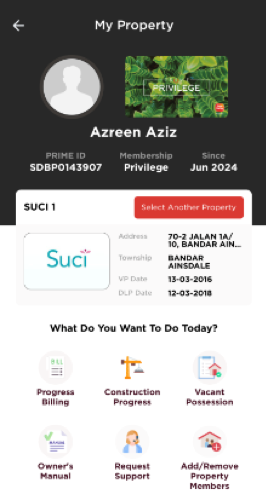
2. Go to the My Property section (or check the notification you received).
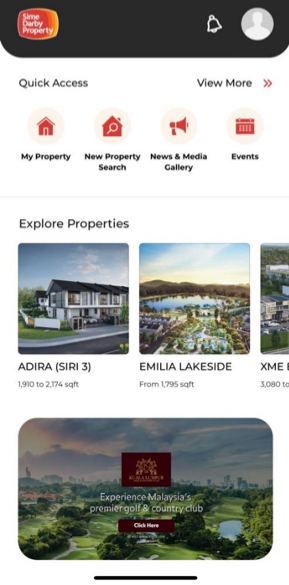
3. Select Vacant Possession.
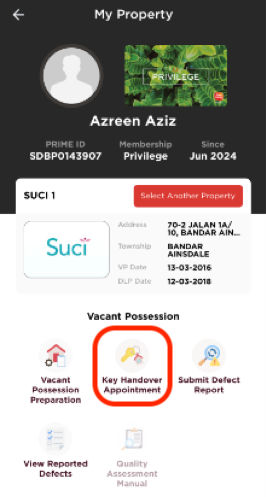
4. Select Key Handover Appointment.
5. Pick an available date and time
(Please note: If the dates are unavailable or greyed out, it may mean the slots are fully booked. Additionally, the appointment date must be at least 3 days from the time you book).
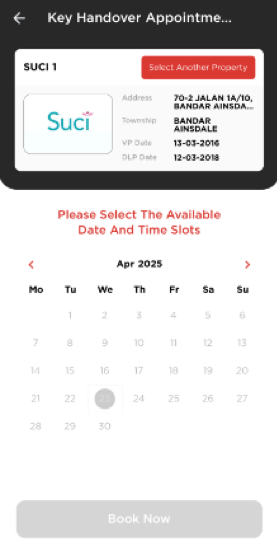
6. Follow the on-screen instructions to Book Now (and upload any required documents, if asked).
7. You’ll get an appointment confirmation in the mobile app and by email with the details and directions.
Tips:
– You can only book once you’ve received the notification and Completion Letter (CL) saying your unit is ready.
– Need to change or cancel? You can reschedule in the mobile app or contact your TCS office via e-mail.